
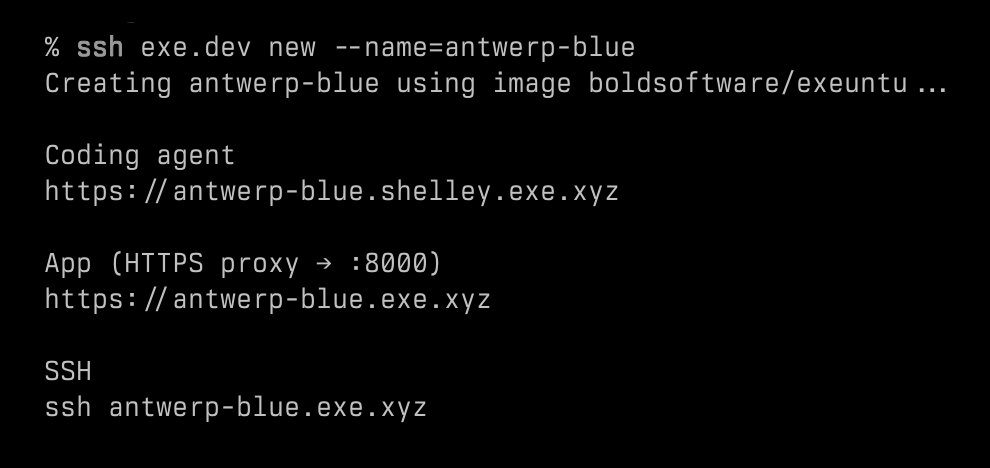
In late April, I discovered exe.dev through “I am building a cloud,” a widely shared blog post by its co-founder, David Crawshaw.1 Since then, I have been playing around with VMs on exe.dev. In this post, I share my experience and some thoughts about it. (If seeing David Crawshaw’s name was already enough to convince you, there’s an invite link at the end of this post.)
Users can create multiple VMs on exe.dev and let AI agents run in them without worrying that agents might break their local machines. There are many cloud VM options on the market, but exe.dev takes a very different approach to how VMs are positioned and used, and the result is surprisingly easy to use. I’m not a programmer. However, even I can use it after reading a few lines of their documentation—yes, no AI help needed here.
In the past few weeks, I mostly experimented with moving projects to different VMs, letting agents work on them, and building out my dotfile setup. At first, I didn’t really use exe.dev’s built-in coding agent, Shelley. It’s an agent that can use models such as Claude Opus and other leading LLMs. Users can also bring their own LLM provider API key or ChatGPT subscription, and use Shelley through the web interface.
A few days ago, I decided to use Shelley to build something useful. First, I cloned a template VM that I had created for the dotfile management practice with a single command: ssh exe.dev cp [my-source-vm-name] [new-vm-name], and in a few seconds, I got a new VM for development. Next, I asked Shelley to use Astro to build me a personal website and host it on another exe.dev VM. My spec was simple: using the style of this website (the one you are reading) and referencing another website for the structure. Shelley then asked me a couple of questions for clarification, such as whether I wanted one or two columns and where the navigation should go. The only thing I had to do manually was create another VM for the production site.
Once everything was set up, Shelley began to work. And that’s it. In just a few minutes, I got a website with all my content copied from this blog, and I could view it through a private link without additional configuration. I can later make it public under my own domain. By that point, it had cost about $4 in credits. (My plan includes $20 in credits per month, plus a one-time $100 credit that doesn’t expire. I can purchase additional credits if needed. You can check the pricing page for the latest plan details.)
Update (2026-09-29): They’ve updated their pricing.
Although there are still parts of the website I’d like to refine, I’m impressed by how quickly the whole thing came together. Shelley can capture screenshots of the page as it works and use them as feedback during development, or simply show them to you after a change—just like the feedback loop I wrote about in this post. My original plan was to put together a thorough plan with Codex or Amp and then let one of them do the job. I also expected to spend a lot of time reviewing the output. Not to mention all the infrastructure-related decisions, such as hosting, networking, and security, especially since I wasn’t planning to make the site public yet.
I know this is not a perfect comparison, because I was used to working with agents under conservative permission settings, while Shelley is designed to require fewer permission prompts.2 And because I mainly wanted to try Shelley, I gave it a fairly simple spec.
Building the website was impressive, but what ultimately got me interested in exe.dev wasn’t the website itself. It was the idea that my agents could have their own computers.
Your Agent Needs a Computer
Before exe.dev existed, David Crawshaw and Josh Bleecher Snyder were already building what we would now call a coding agent. One thing they learned from that work was that agents needed their own isolated environment instead of running directly on a developer’s machine.
At first, they thought containers were the answer. But as they brought the product to more companies, each one seemed to expose a new reason why containers weren’t quite enough.3 Eventually, they concluded that agents needed their own computers. And that became one of the reasons they built exe.dev. It went online in late December 2025.
Don’t get me wrong. exe.dev is not just a disposable sandbox. The VM can host a database, run services, keep files around, and serve as a long-lived workspace for either a developer or an agent.
What makes it different is how lightweight it feels. When I need a VM for a quick experiment, I can get one instantly and it is ready to go. Creating a VM on exe.dev feels more like creating a new folder on my computer than provisioning a new server. Crawshaw wrote this in his post that I mentioned earlier:
A Linux VM is a process running in another Linux’s cgroup, I should be able to run as many as I like on the computer I have.
I think that captures the philosophy behind exe.dev.
As I learned more about exe.dev and its co-founders, I found that David Crawshaw and Josh Bleecher Snyder both worked at Tailscale; Crawshaw was even one of the co-founders and the CTO of Tailscale. If you have read this blog for a while, you probably know I really like Tailscale. In this post, I described how I use Tailscale:
When I take a break between bouldering sessions, believe it or not, I sometimes use the Termius app on my iPhone to SSH into my Mac at home, check Claude Code’s work, or assign it new tasks via tmux running in Ghostty on my Mac.
I want to access my computer and manage my agent anytime I want when I’m on mobile. In this case, I can access my exe.dev VMs in the same way I mentioned above, or just using exe.dev’s mobile web. But now we have a new option with a better experience: an iOS app.
Voice Mode in the iOS App
I’ve been in their TestFlight since mid May, and it’s now in the App Store. The app’s quality is pretty good. There is a special feature I want to talk about: the voice mode.
The voice mode is a voice interface between the user and Shelley, powered by OpenAI’s Realtime API. When I tried this feature for the first time, I thought: why bother? I can just use dictation in the text chat interface with Shelley. But later I realized that the voice mode is different. I can simply tap the microphone icon and start talking, then the voice assistant relays my words to Shelley. When Shelley is done, I get a notification with the result. Most importantly, it can run in the background. In this way, the interaction feels more natural. I don’t have to pick a VM or open a new conversation with Shelley first. Just one tap and start talking.
The only thing I’d like to see improved is what happens after Shelley finishes a task. Right now, I need to come back and ask the voice assistant for an update. It works, but it feels slightly less natural than the rest of the experience.
Interestingly, if I ask something like, “Is there anything that needs my attention?”, the voice assistant can already answer me. From what I understand, it isn’t even talking to Shelley at that point. It’s simply reading from the system’s attention list. That’s why I can’t help but wonder how much more seamless the experience would feel if the voice assistant could proactively surface those updates instead of waiting for me to ask.
My agents now have their own computers, and I can access and manage them from anywhere, by text or by voice. I think it’s great!
Further Reading
You might also be interested in these two posts:
If you’d like to try exe.dev, you can use my invite link because it will give you a 30-day trial (normally it’s a 7-day trial), and if you upgrade to a paid plan later, we will both get an extra $50 in credits for using Shelley! (The referral reward may change in the future.)4
-
Crawshaw published this blog post the same day they announced a $35 million Series A. ↩︎
-
According to David Crawshaw, Shelley is intentionally designed to “work dangerously.” Because it runs inside its own VM, it does not repeatedly ask for permission before taking actions, which Crawshaw considers a distraction that slows both the user and the agent down. To make that model safer, Crawshaw said exe.dev is working on a VM snapshot feature that regularly captures the state of the disk. If an agent accidentally deletes something important, such as a production database, users will be able to rewind the VM to an earlier snapshot and recover it. Source: High Leverage – Ep. #11, Why Agents Need Computers with David Crawshaw – YouTube ↩︎
-
[2026-07-24 update] It seems they’ve just changed their referral program rewards.↩︎

